Azure ATP: How to do exclusion detection?

Hi and good weekend to you. I haven’t been writing blog post for 1 week due to Chinese New Year holiday, 1 week off from doing YouTube videos and writing blog post, and spending quality time with my family. This is the first Chinese New Year celebration without visiting friends or other family members. E-angpao has become our replacement of physical AngPao. Seeing how this pandemic pushes technology forward and forcing people from all different generation to use technology, is amazing.

Anyway, this blog post I’m going to be talking about how you as administrator you can exclude certain situation from the Azure ATP detection. Azure ATP stands for Microsoft Defender for Identity. There are few situation you can exclude from Azure ATP detection such as Backup accounts and replication accounts. Take note this is only based on my experience or Microsoft recommendation but is not a MUST to exclude them.

How the alerts works in Azure ATP, is that when ever the account is behaving one of the detection it will notify an alert to the Azure ATP portal and to administrator’s email. So imagine if you have Azure AD Connect in your environment, your Azure AD Connect service account is notifying your administrator every 30 minutes, because the default replication time is every 30 minutes. Annoying right? Once you confirmed that this is the service account used only for replication, here is how you could whitelist it from the Azure ATP detection;

*This is for replication account, for others situation the exclude value may differ, these steps below is mainly to gain understanding how to exclude and where to locate the exclude.

  1. Login to https://portal.atp.azure.com
  2. Select Settings
  3. Under the Detection category
  4. Select Exclusion
  5. Locate the detection type and select it
  6. There you would see 3 sections for your choices on how you want to exclude it
  7. You can exclude based account name, hostname, IP addresses, subnets and etc..
  8. Key in the value and remember to save it
  9. This changes apply immediately

Recommended that you monitor 24 hours. For your information, email notification doesn’t have to be send to same tenant users, it could be external party domain but beware of your auditors.

The portal is a simple user interface, not as confusing as the Security and Protection portal.

References:
  1. https://docs.microsoft.com/en-us/defender-for-identity/configure-detection-exclusions

Azure ATP: gMSA limitation for single label domain

Good afternoon everyone, and Happy Holiday to you all. Today’s blog post is another Azure ATP, or you could say Microsoft Identity Defender or MDI for short.

As you might know that gMSA is a type of service account for Windows Server 2012 and above. For some reason it failed to establish authentication between a Windows Server 2016 and Azure ATP portal for this particular environment. This environment is running single label domain on a Windows Server 2016. It was migrate from Widows Server 2008 R2 to Windows Server 2016.

To locate the logs in the server that you installed the sensor to further identify the cause and issue,

C:\ProgramFiles\Azure Advanced Threat Protection\<sensor version> \Logs

In the server where your sensor installed, if you notice the Azure ATP services keeps stopping and starting, from the services.msc, then it means there is problem with the sensor trying to establish the connection to the Azure ATP.

There wasn’t much article found to prove that gMSA limitation with single label domain, so I go ahead and proceed a testing. I created a managed service account with no special permission included, and add the credential to the Azure ATP > Directory Service. Upon monitoring, there wasn’t any alert prompt from Azure ATP, Azure ATP alert is pretty instant when detected failure on authentication.

So the resolution was to use managed service account instead of the gMSA account for this situation. The sensor start to working well with managed service account.

Azure ATP: How to setup a gMSA account?

Hey guys hope you all are staying indoors and cautions about your health. Today’s blog post is to understand what is gMSA account, how to create them and why does it required for setting up Azure ATP (a.k.a Microsoft Identity Defender ATP).

gMSA stands for group managed service account, below reference that you can refer to understand details about it. You only need to setup a gMSA account for Windows Server version 2012 and above, it is recommended to use gMSA account for you Azure ATP deployment if your Domain controller fall on the versions 2012 and above.

Why gMSA and not usually service account (user object)? It improves the security and automatic password management. It works similar as a managed service account functionality and with extended capabilities, such as password is being managed by your Active Directory and every 30 days a new password is assigned to this service account automatically. If you have mix of legacy domain controllers and newer version of domain controllers, you would need both type of service accounts.

Note:

  • Azure ATP directory service connection, doesn’t required a gMSA account, to be a member of domain admin
  • If your server doesn’t have the root key created, then run the Add-KdsRootKey command with following parameter “-EffectiveTime“, with value immediately or scheduled.

For this Azure ATP case, all domain controllers with sensor must have managed password permission/right on the gMSA account. Make sure your account has a domain admins right to be able to perform the following setup below;

How to setup a gMSA account?

  1. On your domain controller
  2. Open/Launch PowerShell cmdlet
  3. Type the following command
    New-ADServiceAccount -Name <ATP service account name> -DNSHostName <FQDN of 1 of your domain controller> -PrincipalsAllowedToRetrieveManagedPassword <domain controller hostname01$>,<domain controller hostname02$>
  4. Sample of the command
    New-ADServiceAccount -Name AzATPSvc -DNSHostName DC01.contoso.com -PrincipalsAllowedToRetrieveManagedPassword DC01$, DC02$
  5. Retrieve your change result command
    Get-ADServiceAccount -Identity AzATPSvc -Properties PrincipalsAllowedToRetrieveManagedPassword
  6. Testing the service account command
    Test-ADServiceAccount -Identity AzATPSvc

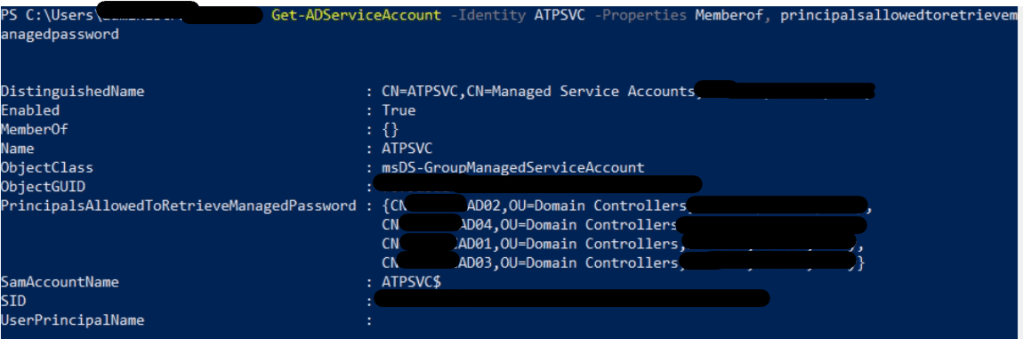
If your customer is highly concerns about what sort of permission this account is assigned you may run the command below;

  1. Get-ADServiceAccount -Identity AzATPSvc -Properties MemberOf

Sample image

References:

  1. https://docs.microsoft.com/en-us/defender-for-identity/prerequisites#-sensor-requirements
  2. https://docs.microsoft.com/en-us/windows-server/security/group-managed-service-accounts/getting-started-with-group-managed-service-accounts#BKMK_AddMemberHosts
  3. https://adsecurity.org/?p=4367

Azure ATP: Azure ATP capabilities and mechanism

Hey everyone, hope you guys had a wonderful day. Starting of a new year 2021. I hope everyone stay healthy and stay safe distance from one another or avoid crowded places.

I know that this pandemic has test us in many ways, in terms of physically and mentally. If you manage to get through year 2020 challenges, then give yourself a pad on the back, you did good.

This blog post I’m going to write about what is Azure ATP, before I jump into the topic, I want to say that security is a journey. If you guys have read about the recent news about attacks rises double/triple in the year 2020 and also the news about solarwinds attack, then these are enough proof that hackers are given more chances to attack in this situation, because they know majority businesses or corporates are still vulnerable or not up to par in terms of securing their environment and providing security training to users. Users mistakes in allowing attackers are also risk to the corporate that is why users training is still important to corporates. Losing money/profit to attackers is twice painful to the corporates then purchasing and implementing security technologies/products in the environment. Let’s take ransomwares as an example for this case. Due to this pandemic, I notice quite an amount of corporates are now implementing the concept of “Zero-trust“. If you would like to know what is “Zero-trust”, do feel free to Google them up.

Anyway, alright lets start our topic. The ATP term has been quite awhile in the security industry, or if you still not too sure what is ATP, ATP stands for Advanced Threat Protection. It contains advanced intelligent technology and combination of algorithms to identify and investigate types of malicious behavior and it will select appropriate action to quarantine/block the malicious actions before doing any harm to the environment and provide deep dive detailed reports to administrators.

Azure ATP has been known quite awhile in Microsoft 365, and Microsoft had given a different naming, Microsoft Identity Defender. It’s capability is to:

  1. Identify compromised accounts
  2. Investigate malicious activities of accounts
  3. Provide best practice security actions to administrators on how to handle accounts that reported by Azure ATP as suspicious or compromised
  4. Provide detail visibility authentication of attacks
  5. Azure ATP able to provide details of attack’s source
  6. Reports are real-time and signals back to Microsoft Identity Defender portal

This is just a summary of the entire structure looks like implementing Azure ATP into the environment with Domain Controllers only.

Azure ATP agent is only for on-premises like Domain controllers and ADFS and the agent will send a signal back to Microsoft Identity Defender if detected malicious activities or compromised accounts. I do recommend that you read more about requirements of deploying Azure ATP, before deploying into your customer’s environment. There is a medium impact required.

References

  1. What is Microsoft Defender for Identity? | Microsoft Docs
  2. Microsoft Defender for Identity architecture | Microsoft Docs

Azure Autopilot: Unable to delete managed Autopilot devices

Hey guys and girls, hope you are enjoying your weekends. Please do keep a safe distance while you are in public area and wearing your mask.

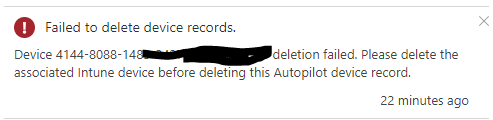
So while I was doing my lab testing and wanting to remove the device from managed autopilot but it was failed to do so, due to the device were managed by Intune. Below is the error, if you would try to delete the device object from Autopilot.

To resolve this issue, is to remove the device from Intune and then you could able to remove the device from Autopilot.

As you may know that Intune is now no longer to be found in Azure portal, and it has moved to Microsoft Endpoint Manager admin center portal.

Steps to proceed to resolve this issue are;
  1. Access or login with your necessary credential that has permission to enter Microsoft Endpoint Manager admin center
  2. One the left taskbar, Select on Devices
  3. Select platform : Windows
  4. Search for the device name that you would wish to remove
  5. Once the device is found, select on the device and click Delete
  6. For the device to be deleted, will take around 3 to 5 mins
  7. Click on the Refresh, to make sure the device is completely deleted
  8. Once the device object is completely deleted, on the left taskbar select on Devices
  9. Select Enroll Devices
  10. Select Windows enrollment
  11. Select Devices Managed Autopilot
  12. Search for the device and Select the device that you wish to remove
  13. Click Delete and you have successfully delete the device from Autopilot

PowerShell: Unable to delete Stuck Data Leak Policy using “-ForceDeletion”

Hi Guys and girls, hope you all are doing well, and remember to stay safe. Just got the PowerShell check on the command “Remove-DlpCompliancePolicy“, it seems that Microsoft had made some changes to it and had removed the “-ForceDeletion” parameter from the “Remove-DlpCompliancePolicy” command.

Appreciated and thanks to the commenter that ping me on this at one of my older blog post https://sabrinaksy.com/2019/01/04/office-365-security-and-compliance-data-leak-protection-dlp-azure-information-protection-aip-integration-unable-to-delete-dlp-policy/ .

Just to announce that if you would like to remove or delete the stuck DLP policy in Security and Compliance, you would have to raise a ticket to Microsoft and inform them to perform the force deletion at their backend. There are users experience this and it is resolved through Microsoft Support.


References

  1. https://docs.microsoft.com/en-us/powershell/module/exchange/remove-dlpcompliancepolicy?view=exchange-ps
  2. https://answers.microsoft.com/en-us/msoffice/forum/all/dlp-policy-stuck-on-deleting/6b7bc384-e330-4ca8-bfdd-f84101f814c8

Intune Azure Portal is Retiring

I think some of you are still not noticing that Intune Azure portal experience will be retiring this coming August, 2020.

In the year 2017, the first time I was experience with Azure portal, well it was the old Azure portal (manage.windows.com), and slowly transition to portal.azure.com and now endpoint.microsoft.com.

So this is how Microsoft Endpoint Manager looks like,

Capture


Capture

Do give it out a try for yourself, if you haven’t.


Where do I get to know that Intune Azure Portal experience is retiring? When you select Intune in your Azure portal you will notice that is a prompt at the top the the image below,

Capture

Azure & PowerShell: Service Plan Information

Hey dudes and ladies! Malaysia Movement Control Order has announce extend till 12th May but with relax conditions. Before the announcement, there was a decrease in number of reported cases and we had hope that there won’t be another extend announcement. However, the reported cases increases. Anyway, hope you guys are doing good at home, to those are infected by Covid-19, hope rapid recovery and to those are getting racism attack or getting criticism from past infection, hope you don’t hurt yourself which is not your fault.

Have you ever have customers that wanting to disable certain service plans in subscription or license? Are you going to manually click person by person to disable? Of course not! Things like these is best to use PowerShell, you could even generate/export a report.

Note:

  1. Don’t call Microsoft Support to identify your service plans because they have no idea and they most likely don’t take your case. Trust me I been there.


There are 2 type of command library you could use to extract these information either Azure AD PowerShell or MSOnline PowerShell. Play around with the service get to know which is the service that it belongs to and which service has dependency.

Below the list of service plans for Office 365 Enterprise E3 and E5;

  • I grab the below information using MSOnline PowerShell, this was during the year 2017. I will post up a new update.
Office 365 Enterprise E3
-------------------------
Deskless
FLOW_O365_P3
POWERAPPS_O365_P3
TEAMS1
ADALLOM_S_O365
EQUIVIO_ANALYTICS
LOCKBOX_ENTERPRISE
EXCHANGE_ANALYTICS
SWAY
ATP_ENTERPRISE
MCOEV
MCOMEETADV
BI_AZURE_P2
INTUNE_O365
PROJECTWORKMANAGEMENT
RMS_S_ENTERPRISE
YAMMER_ENTERPRISE
OFFICESUBSCRIPTION
MCOSTANDARD
EXCHANGE_S_ENTERPRISE
SHAREPOINTENTERPRISE
SHAREPOINTWAC

Office 365 Enterprise E5
-------------------------
Deskless (StaffHub)
FLOW_O365_P2 (Flow)
POWERAPPS_O365_P2 (PowerAPPS)
TEAMS1 (MsTeams)
PROJECTWORKMANAGEMENT (Planner)
SWAY (Sway)
INTUNE_O365 (Mobile Device)
YAMMER_ENTERPRISE (Yammer)
RMS_S_ENTERPRISE (Azure Right management)
OFFICESUBSCRIPTION (O365ProPlus)
MCOSTANDARD (Skype For Business)
SHAREPOINTWAC (Office Online)
SHAREPOINTENTERPRISE (SharePoint Online)
EXCHANGE_S_ENTERPRISE (Exchange Online)

Below Microsoft 365 Enterprise E5 using Azure PowerShell;

*the list is too long so I’m just going to show partial only.

Capture

This below is using the MSOnline Powershell;

Capture


References:

  1. https://docs.microsoft.com/en-us/office365/enterprise/powershell/view-account-license-and-service-details-with-office-365-powershell
  2. https://docs.microsoft.com/en-us/powershell/module/msonline/get-msolaccountsku?view=azureadps-1.0


Azure Storage & Office 365 Import PST: Troubleshoot Error “HttpStatusMessage: Bad request”

Hey guys and girls, just hope everyone are good during this Covid-19, movement control. Those that are hospitalize, hope that you recover. Those that have recovered, hope that you don’t face any criticism from others and not fall for Covid-19 again.

Well for IT field workers, our work still continues. In my lab environment, I was testing out Office 365 Import PST feature in Security and Compliance. Personally I feel this is a good feature but there is too much manual work on it.

Note:

Using network upload to import PST files is free.

Check out license plan to have this import feature at the reference below.

So just a brief explanation of what I was performing, in the Office 365 Import PST has 2 option for us on how we want to upload the PST, either network upload (free) or physical (Charges). I choose network upload to upload my PST, it require to use AzCopy command to run the upload. I have a PST that the size is more than 1 GB, and the upload failed with the following error message on the AzCopy console shows “HttpStatusMessage: This request is not authorized to perform this operation using this permission.

At first I thought that there could be limitation on the upload size, due to the given Azure Storage is temporary only. Looking through the documentation it didn’t state any upload limitation. Hence, further research.

The resolution to this was to disable the ATP agent that was in my lab PC, to prevent blocking the upload. Rerun the AzCopy command again to reupload the PST.

If you have any third party or applications that has network control or ATP functionality, would recommend that you disable to avoid this problem happen to you.


References:

  1. https://docs.microsoft.com/en-us/microsoft-365/compliance/faqimporting-pst-files-to-office-365?view=o365-worldwide
  2. https://www.microsoft.com/en-us/microsoft-365/business/compare-more-office-365-for-business-plans

Intune Autopilot: Troubleshoot RDP access prompt

So I am testing Autopilot in my lab environment, consist a Hyper-V with its Virtual Machines. Well I am doing a manual registration, so how do I export the device information that is required my VM to be register for Autopilot?

I already have a VM running Windows 10 Pro, and I ran this script to export and automatic import the device information to be register into autopilot. However, I wasn’t running the script before Out-of-the-box-experience (OOBE) happen, so to make Autopilot work on my VM, I had to reset my VM.

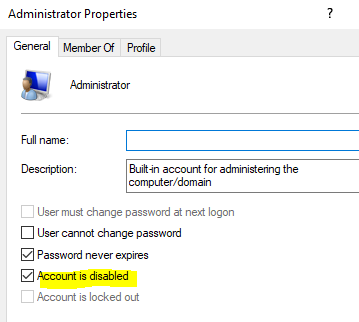
Once the VM has reset,  it ask for region, language of my keyboard and next it shows a welcome page with the Display name and the company name. So I key in the email address and password of the user and also setup the PIN. However, I just notice that I set this user with the Standard permission only. Thus, the administrator account is disabled and I keep getting the RDP permission error prompt due to the user account is not in the RDP group in the VM.

Example of the prompt;

To sign in remotely, you need the right to sign in through Remote Desktop Services. By default, members of the Remote Desktop Users group have this right. If the group you’re in doesn’t have this right, or if the right has been removed from the Remote Desktop Users group, you need to be granted the right manually.

050317_1039_Tosigninrem1

How I troubleshoot this;

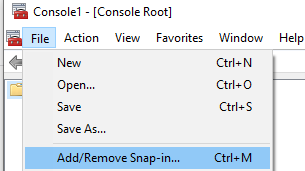
  1. Is to run MMC as administrator > File > Add/Remove Snap-in
    • Capture
  2. Key in your Office 365 admin account (an account with permission that can manage device)
  3. Select Local Users and Groups > Add
    • Capture
  4. Select Local computer > Finish > Ok
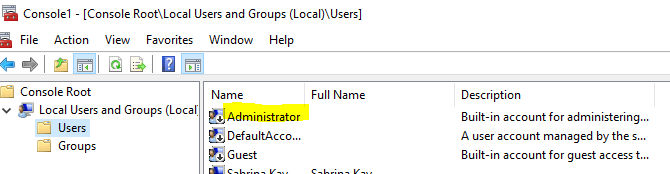
  5. Expand the local users and groups > Users > Right click Administrator  > Uncheck Account is disabled
    • Capture
    • Capture
  6. Reset the local Administrator password too
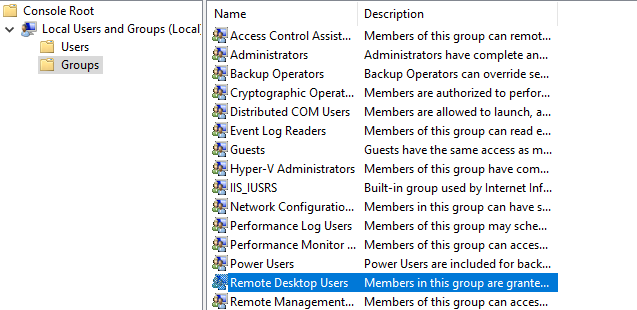
  7. Select Groups > Right click on the remote desktop users > Add > Authenticated users > Ok
    • Capture
  8. Close MMC
  9. Sign out and Sign in again


These steps should help you from getting the prompt again.

Please take note that I am doing this in Lab environment. In production, by right not to enabled administrator account and not to do any changes to the local users and groups.