Microsoft Sentinel: The tips to start off your journey

Hi everyone, has been months that I’ve not written anything. Hope you guys are having a great time. I had some medical attention needed to attend to and taking the rest that I needed. I’m just here writing about how I started my journey into learning Microsoft Sentinel. I would say it wasn’t piece of cake, and it did take times of tests to run in order to get the results that I wanted. I know that there are a lot of products trying to compete with each other with the concept of SIEM and/or SOAR.

To put them to the comparison is to initiate trial to test out. There is always a hidden purpose of these products, such as prevent and protect based on what’s in their Database. Products that are based on database, to prevent and/or protect tends to require manual action if there are any new virus being found. This doesn’t mean that they aren’t a good product but just depends on your budget, compatible with National Bank Security Policy (Bank Negara), whether you will bite the bullet if anything happens or etc..

I would like to show you some tips on hoping into the technical part of Microsoft Sentinel. I know that for starters you may feel confused on how to start off, you may start off in preparing the correct license (Azure subscription Trial), get the correct permissions to allow you to use the functionality of Microsoft Sentinel, setup your new LA (Log analytics) workspace and you’re good to go.

*Note: Trial license has a MB size limit and expiration date. Please use it wisely or adjust the usage using the limit function.

If you are dealing with license DT (distributor) for getting your Azure license, they tend to worry in providing the permission to the reseller, because afraid that the reseller would done clumsy actions. There are indeed cases had happened. Just make sure prepare your permissions to the DT to assign for you.

Once you got your basic setup complete, you may go ahead and start your very first script and automation rules and action.

*Note: I have a practice of giving at least 24 to 48 hours for the setup and data transfer (Connector) to the sentinel to be fully propagated.

There are lots of useful scripts that you can find in GitHub but which one would suit this situation? Well, I got my ideas from this link https://github.com/Azure/Azure-Sentinel for more customization scripts would be on your own. There are lots of useful scripts inside there and you can alter it as you like to suit your situations. That’s what I like about Microsoft Sentinel.

If you have any questions about the cost utilization of the Azure subscription, you can ask your license provider and they are kind to help you out.

Referrences:

  1. https://learn.microsoft.com/en-us/azure/sentinel/quickstart-onboard
  2. https://github.com/Azure/Azure-Sentinel
  3. https://learn.microsoft.com/en-us/azure/sentinel/prerequisites
  4. https://learn.microsoft.com/en-us/azure/azure-resource-manager/management/azure-subscription-service-limits

Microsoft Sentinel: What to do with Deprecated Analytics Rule

Hi guys hope you all are having a great weekend. I just wanted to share about the deprecated analytics rule that is in Microsoft Sentinel. You should be able to find deprecated rules from your active rules in Analytics.

How should you remove them? When will it impact? What can I do? Who will it get impacted? Where can I find the dependency?

Steps to Remove

  • If you only have just a few of them > To remove them from active rules > is by checking its checkbox > Select Delete on the top taskbar.
  • If you have alot of them > To remove them from active rules > is by checking the bulk checkbox > Select Delete on the top taskbar

Steps to Find Dependency

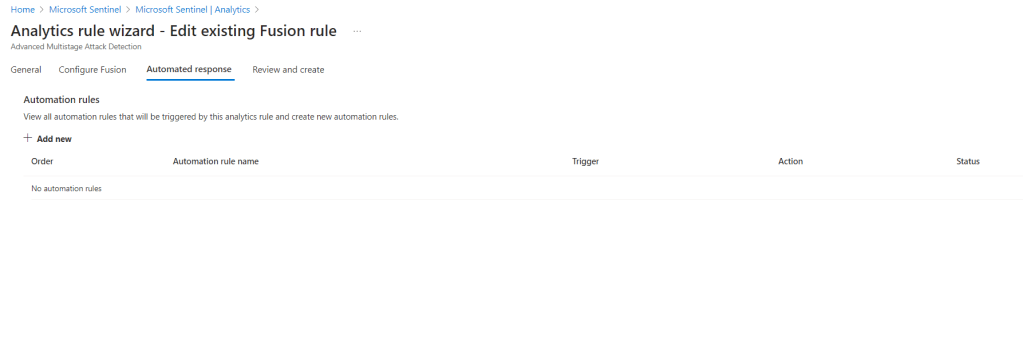
You can check its dependency by editing the rule and check for any automated response rules. This will definitely help you to find the dependency and make adjustment to your automated response rules.
If your analytics rules are more than your automated response rules, you can search the dependency based on automated response.

If you have playbook running on the automated responses rule that has dependency with the analytics rule too, should also identify the dependency within the playbook design.

If you would like to know more about detecting threats using the templates that are already given by Microsoft Sentinel, feel free to review the references below. With templates given really ease your effort of creating custom rules and troubleshooting it.

Have the deprecated rules in the workspace still running, you won’t be able to receive alerts and your automation rules will not perform as it should be too.

References:

  1. https://learn.microsoft.com/en-us/azure/sentinel/detect-threats-built-in

CheckPoint Firewall & Microsoft Sentinel: Troubleshoot Data Connector Disconnected

Hi everyone, hope you guys are staying safe and keep yourself healthy. Would like to share you another troubleshooting experience of mine.

I noticed that the CheckPoint connection status was disconnected from the data connector in Microsoft Sentinel portal. Hence, I put on my thinking hat to troubleshoot this issue. It was tricky though but luckily the troubleshooting command manage to give me some hints, what was causing this disconnection.

My findings were:

  1. Syslog connector still exist
  2. CheckPoint Firewall forwarder connector was not found

I proceed my next action on troubleshooting it,

  1. I ran the troubleshooting command from the Microsoft Sentinel data connector for CheckPoint in the Syslog connector VM (Centos)
  2. It shows me that I need to change my Syslog’s SELinux mode to permissive
  3. To modify the SELinux mode run the following command, this is where the mode located, is inside the directory/file below “/etc/selinux/config”:
    • vi /etc/selinux/config
  4. Change the SELINUX=enforce to SELINUX=permissive
  5. Click the button “ESC” on your keyboard
  6. Type the command to save and quit: wq!
  7. Click the button “ENTER” on your keyboard
  8. Restart the VM by typing the command sudo reboot

First issue completed but there was a second issue prompt, it mentions that it would require me to disable auto-sync to prevent duplicate records sync to Microsoft Sentinel. Hence, the next action is below,

  1. Type the following command sudo su omsagent -c 'python2 /opt/microsoft/omsconfig/Sripts/OMS_MetaConfigHelper.py --disable'
  2. Restart the VM by typing the command sudo reboot

You might not like my idea of rebooting the Syslog connector VM, no worries you can proceed to follow just by restarting the service instead.

Noted:

Kindly note that the command above may not suit your situation because different Linux Operating System has their own command language. Anyway, the concept is pretty common sense.

References:

  1. https://access.redhat.com/documentation/en-us/red_hat_enterprise_linux/8/html/using_selinux/changing-selinux-states-and-modes_using-selinux
  2. https://learn.microsoft.com/en-us/azure/sentinel/troubleshooting-cef-syslog?tabs=cef

Microsoft Sentinel: Things to know before you start migrate to a new resource group in the same tenant

Good morning fellow friends. Hope you are having a fresh start of the day. I would like to write about my journey on Microsoft Sentinel during migration phase.

Microsoft Sentinel is SIEM and SOAR security solution providing corporate the flexibility and better visibility in terms of managing security logs from Microsoft security products and third-party products and threats prevention.

Let’s begin…

Current situation of what I have in my Microsoft Sentinel is,

  1. Solution running on a trial subscription
  2. Resource group 1
  3. Some queries
  4. Some connectors (Microsoft and third-party)
  5. Some Logic app
  6. Some Automation rules

I would like to migrate from the trial subscription to the CSP subscription, this migration would likely be perform by your license provider and request them to provide the appropriate permission so that you can perform your management on the Microsoft Sentinel in the new subscription.

Note: This is not migrating from one tenant to another tenant.

The highlighted in RED are the ones you would need to perform backup, making sure the connection is up and the authentication is establish.

The New resource group has the current resource group resources,

  1. Solution is now running on paid subscription
  2. Resource group 2 (You would need to create a new resource group)
  3. Some queries (Custom queries needs to be regenerate)
  4. Some connectors (Make sure connectors with log forwarder is working else you would have to reestablish)
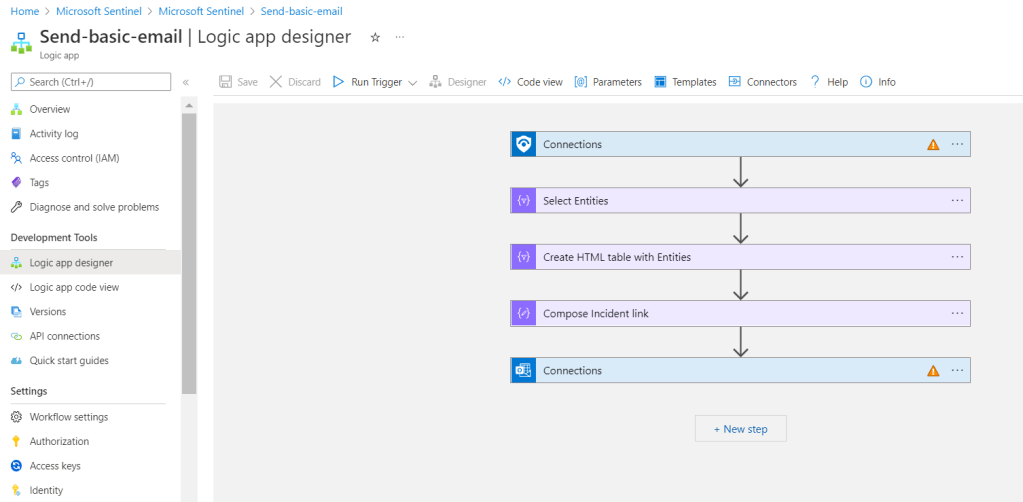
  5. Some Logic app (Reauthenticate your log workflow)
  6. Some Automation rules
Example of warning in Logic app designer

That is all you would need to know in advance before you start your migration. Hopefully you would find this article knowledgeable for you if you are heading to migrating your Microsoft Sentinel to a new subscription. Is never a waste of time if you are used to double checking or triple checking that all the resources are connecting and working well after migrated.

References:

  1. https://docs.microsoft.com/en-us/azure/azure-resource-manager/management/move-resource-group-and-subscription